Friday, September 14, 2012

Flippin' the Classroom??

Flipping the classroom... so what's that? No it's not a "not-so-hilarious-April-Fool's-Day-joke" (actually that would definitely not be funny at all... maybe this concept is incorrectly named, as you don't want to give anyone ideas!!!)

According to Wikipedia, this is the definition of the "Flipped Classroom" or "Flipped Teaching"

Flip teaching is a form of blended learning which encompasses any use of Internet technology to leverage the learning in a classroom, so a teacher can spend more time interacting with students instead of lecturing. This is most commonly being done using teacher created videos that students view outside of class time. It is also known as backwards classroomreverse instructionflipping the classroom, and reverse teaching[1]


The traditional pattern of secondary education has been to have classroom lectures, in which the teacher explains a topic, followed by homework, in which the student does exercises. In flip teaching, the student first studies the topic by himself, typically using video lessons created by the instructor[2][3] or shared by another educator, such as those provided by the Khan Academy. In the classroom, the pupil then tries to apply the knowledge by solving problems and doing practical work.[4][5][6] The role of the classroom teacher is then to tutor the student when they become stuck, rather than to impart the initial lesson. This allows time inside the class to be used for additional learning-based activities,[7] including use of differentiated instruction and project-based learning.[8]
Flip teaching allows more hands-on time with the instructor guiding the students, allowing them to assist the students when they are assimilating information and creating new ideas (upper end of Bloom's Taxonomy).[9]

[Reference: http://en.wikipedia.org/wiki/Flip_teaching, September 14, 2012]

Watch this video... It explains the concept well...
"The Flipped Classroom"


"The Flipped Classroom is Born" (2007)


Classroom flipping involves students preparing for a lesson in advance using on-line technology (Youtube videos etc), then coming to class to work on the concept collaboratively with students while the teacher assists and further hones knowledge and skills... There is no "Homework"... actually there is.. but perhaps it could be called "Student Prep Work".

Advantages...
The class becomes far more student centered... not just teacher centered.... Traditional model is not followed...
Teachers can become more "Facilitators of learning" or "Learning Guides" and take students to another level of understanding or developing the skill.
Students know what they are studying in advance, and can work at their own pace.
Students have a preliminary understanding of what's taught, then they can spend valuable class time further developing their understanding or skills.
Students can spend more time collaborating or discussing with other students their ideas or exploring projects.
Students arrive in class, ready to apply what they learned at home.
The strategy truly embraces the philosophy that students must become Life Long Learners, and leaders in their own learning.
The Flipped model, explores the upper levels of Bloom's Taxonomy, further than traditional models of teaching.

Disadvantages...
What if students do not have access to the technology?
Extra prep time would be required of teachers... What if the teacher does not have access to the technology to prepare the lesson?
Are schools up-to-speed in helping bring this concept along... or is this a very futuristic concept?

Moving Forward...
Should we let the road blocks stop us? What can we do as "baby steps" to move forward?
* In math class, direct students to Khan Academy to a particular lesson on the site, then assign practice problems on Manga High or IXL that reinforce the concept... Perhaps easier elements of the concept.
* In Social Studies, find videos or sites that explore some of the preliminary aspects of the lesson to be taught. However, keep it interesting... not just a long documentary without the purpose explained. Assign questions or reasons why students are watching a particular video or reading about a particular concept. Students could come to class with a good understanding of the concept, then discuss in small groups while tacking a problem or assignment related to the concept.

Other ideas... Time to think... How can a school or PLN bring this concept alive? What can you start doing now?


Resources:
Flipping the Classroom - The Economist
http://www.economist.com/node/21529062

How the Flipped Classroom is Radically Changing Learning
http://www.thedailyriff.com/articles/how-the-flipped-classroom-is-radically-transforming-learning-536.php

Youtube Video, "The Flipped Classroom" http://www.youtube.com/watch?v=2H4RkudFzlc

Youtube Video, "The Flipped Classroom is Born" http://www.youtube.com/watch?v=v-y9vR7YTak&feature=relmfu

Top 9 Resources for an iPad Initiative


Top 9 Resources for an iPad Initiative  
Amanda Allen and David Lopez, who introduced a 1-to-1 iPad program at St. Genevieve Elementary in Los Angeles, suggest the apps, Web sites, and programs they found most useful.
1. Popplet--Simple, graphic organizing tool. All grade levels.
2. iCardSort--A virtual set of Post-It notes. Middle School and up.
3. Flashcards+--Allows students and teachers to easily create paperless flashcards. Syncs to a website called Quizlet that lets one download flashcards others have uploaded. “It’s kind of like crowdsourcing for studying,” Lopez said.
4. GoodReader--A digital PDF reader that allows students to highlight passages and take notes in the margins. Middle School and up.
5. Apple’s Volume Purchase Program for Schools--Sells apps at a discount for schools when they are purchased in quantities of 20 or more. All grade levels.
6. Edmodo--One of “the best things teachers will use,” said Lopez. “In a nutshell it’s Facebook for the classroom. It looks and works like Facebook and it does everything: calendars, lists, document hosting, quiz assignments. It worked really well with the iPad program with our school. Everyone had a device and a place to communicate.” All grade levels.
7. TeenTribune.com--A website that provides current events for students. Middle School and up.
8. Good Notes--A note-taking app that records audio with the notes. Middle school and up.
9. Mathaliens--A basic mathematics app in which an alien pops up when students answer correctly. Kindergarten-fourth grade.

Free the Children Resources, Lessons and Sites


WHY MAKE A DIFFERENCE?

As young people, the world is in your hands. Yes, it might sound cliche... but it's
true. You will inherit the world, but why wait to make a difference?


Act now, get involved.


Apathy is not an option...


The people of the world are depending on your idealism, optimism and hard work!


Who are Craig and Marc Kielburger??


The accidental activists: Craig and Marc Kielburger - Community - Life - Canadian Living


Free the Children Official Site
http://www.freethechildren.com/


Haiti and Free the Children Get Involved Youth Campaign
 - Lesson on Sustainability and continuing to assist Haiti
- Social Studies, ELA and Religion
http://www.freethechildren.com/getinvolved/youth/campaigns/la_solidarite/docs/Haiti%20La%20Solidarite%20lesson%20plan%20-%20secondary.pdf
-Youth Initiative Video with FTC and Haiti
http://www.youtube.com/watch?v=kH7tisqzJBE

October ...

Halloween for Hunger Site 
http://www.freethechildren.com/getinvolved/youth/campaigns/campaigns.php?type=halloweenforhunger

Halloween for Hunger Lesson Plan
http://www.freethechildren.com/getinvolved/youth/campaigns/halloweenforhunger/docs/Halloween%20for%20Hunger%20elementary%20lesson%20plan.pdf

Halloween for Hunger Campaign - Getting Started
http://www.freethechildren.com/getinvolved/youth/campaigns/halloweenforhunger/docs/H4H%20How-To%20Guide.pdf

November...

Vow of Silence
http://www.freethechildren.com/vowofsilence/
iamsilent.com

What is the Vow of Silence?
http://www.freethechildren.com/getinvolved/youth/campaigns/vowofsilence/docs/VOS%201%20pager.pdf

Vow of Silence How to Guide
http://www.freethechildren.com/vowofsilence/doc/Vow%20of%20Silence-HowtoGuide_Sept25.pdf

Vow of Silence Lesson Plan
http://www.freethechildren.com/vowofsilence/doc/Vow%20of%20Silence%20_elementary_lesson%20plans.pdf

Check Youtube for Vow of Silence Promotional Videos to kick off campaign
http://www.youtube.com/watch?v=wt0YlunaO6s&noredirect=1


Independent Review of Free the Children Resources by Barbara Hoskins
Explains how each resource is intended to be used and the integration into subject areas from ELA, to Social Studies to Religion to Technology...
http://www.freethechildren.com/whatwedo/local/youthengagement/docs/Free%20the%20Children%20review%2002-21-11%20-%20Barbara%20Hoskins.pdf


Global Voices - Articles with lessons sent weekly - Integrate into ELA, Social and Religion
-Download
http://www.freethechildren.com/whatwedo/local/globalvoices/

Directors of Change - A freely-available online curricular resource designed to promote civic engagement. It provides lesson plans so that students can identify issues of concern, research these issues and design web-based presentations to inform others and encourage action. This resource is designed to support learning in social studies, language arts and technology.
http://www.freethechildren.com/getinvolved/educator/programs.php?type=director

Called to Change the World - A resource guide designed in partnership with the Catholic Curriculum Corporation in Ontario, Canada. These materials are designed to follow the Catholic unifying themes and essential questions from their curriculum maps and use the effective teaching practices of Free the Children. These practices include: providing learner-centered activities to increase awareness, promoting critical thinking, developing communication skills, and engaging in socially responsible action with others.
http://www.weday.com/doc/library/secondary/Catholic%20Resource_gr11-12.pdf


Adobe Youth Voices - A program offered in partnership with the Adobe Foundation that provides teachers and students in underserved high schools the opportunity to use cutting edge multimedia to effect social change globally and locally. Participating students create media projects on an issue of their choosing and exhibit their projects at the end of the year. Teachers are provided with professional development to enhance their teaching strategies so that they can support their students in using media for social change.

http://www.freethechildren.com/whatwedo/local/adobe_youth_voices/

Go Local - A program that serves teachers and students in underserved high schools and middle schools by providing leadership training to support student volunteerism in their local communities.
http://www.freethechildren.com/whatwedo/local/golocal/


Take Action with Community Mapping – Materials developed in collaboration with the O Ambassadors Program. This is a highly accessible guidebook that can be used by teachers to assist young people in learning to make a difference in their local communities through community mapping. Community mapping guides students to assess the needs in their communities, identify strengths and resources, and develop action plans. This guidebook is visually engaging and uses relevant examples of activities taken by other young people.


We Schools in Action Program – Resources made available for schools for use in their service learning programs. It is designed to inspire students and give them the interactive tools needed to become involved in social justice and volunteerism. Print and internet resources are available through the We Schools website. Issues are presented in a way that is relevant to the lives and learning styles of young people. It provides students with forums for sharing plans and accomplishments and assists educators in mentoring young people to make positive changes in their communities and globally. The program does not solely encourage participation in Free the Children projects, but rather, students are taught how to create their own projects and make changes that are important to them.


Are you ever finished changing the world? Are you ever finished making a difference?? The answer is always "NO!!!!"


Wednesday, September 12, 2012

Common Sense Media

Yep another awesome resource... love it... from ratings on novels for teens to apps and appropriate age level. This site is great for parents and teachers.

Teachers, I particularly love the curriculum related page. There is cyber bullying awareness units. See the toolkits link below.
http://www.commonsensemedia.org/educators/toolkits

The Media and Me - Stereotyping lessons and videos
http://www.commonsensemedia.org/educators/gender

Digital Citizenship from K- 12
http://www.commonsensemedia.org/educators/erate-teachers

Most lessons are FREE, but teachers and parents will have to register at...
http://www.commonsensemedia.org

Groovin' Sharks?? Huh??

Follow me at Grooveshark.com (My groove shark name is my name... Jennifer Stewart-Mitchell)

Well, don't feel obliged to listen to the music playlists I added, but check it out for yourself! It's FREE!!!!  Create your own playlists and play from your computer.

Seriously, this is a great site! Again, it's free... listen to your favourite songs in a playlist format without having to download.... Slick and easy!

Tuesday, September 11, 2012

Pic Lits poem

PicLit from PicLits.com
See the full PicLit at PicLits.com

StoryBird and Other Great Edtech Resources

I stumbled upon a great collection of educational interactive tools. I decided to check them out and include the ones I thought were worth an educator's time. If it's free, it made me really  happy... actually fireworks erupted in front of my eyes and I think I could hear a faint humming in my ears. Oh... I really need to get out....


THE LIST....
scoop.it  is a magazine on what's popular on the web... FREE!
Management tool for Teachers... Class Dojo... More free stuff! Classdojo.com

Do you have students that are required to write a story, but just don't know where to begin?? Or students that are RELUCTANT to even write? Try Storybird, this FREE site provides a huge collection of artwork that students can use as inspiration to write stories.
Visit Storybird.com
Did I mention that it's FREE??
You can give each student  a log in and password.  They do not need their own email account.  The account is also private. Sweet!


Want to grab everyone's attention with your own talk show? Seriously, your own talk show? How insane is that?  Students will love it. Just note that there is quite an eclectic collection of unusual shows on the site. Visit blogtalkradio.com - Create a FREE "original talk show", internet radio show or podcast for 30 minutes. Students can set up fairly easily, or teachers can create a classroom site. Remember to keep students' identities to "on-line identities" or false identities for security. Site provides a forum for audio blogging for students... and it's free!!


Need a place to create a slideshow for a class collaborative project? Need something simple? Try picturetrail.com - to create on-line slideshows....
Easy to use... just add photos, choose decorations,background and transitions...save and get code, and it's FREE!

3-D pictures... Yes, make regular photos 3-D... Use for Visual Art, Language Arts, Social Studies...   Try photosynth 
http://photosynth.net/default.aspx  - Capture your world in 3-D.  Shoot wraparound panoramas or full "synths", share them with friends, and publish them to Bing... all for FREE!

Fake Facebook Wall Creator - Visit the "Wall Machine" at http://thewallmachine.com
Yep, it's FREE!

This is FREE too!

LiveBinders.com - Collect binders, organize information, make your site a knowledge "hub"... More importantly, eliminate hundreds of bookmarks and allow accessibility from every computer... All this for FREE!


Imagine a FREE PLN for your classroom. A place where you can post assignments, showcase student work, embed video clips, create polls, share links, allow for student collaborative assignments... Plus... there are no student emails required, therefore protected for students and it's easy to use!! Interested yet??? Visit edmodo.com

minigroup.com - collaborative site... Try it with students... Initial program is FREE.

www.snacktools.com - use to create portfolios or digital "flip books" of student work... FREE app for Ipads.


piclits.com - Words and photographs inspire users to write, express themselves, and share their work with others. The site provides a forum for creative writing (poetry...), social interaction, and can also be used as a teaching tool. Super easy to sign up... Easy to embed into a blog or create a link! Organize and share the best of the web with your students for FREE!

http://www.symbalooedu.com/linoit.com - On-line stickies... FREE mind mapping web tool. No registration required to post on a canvas (only to create one). Use for collaboration and sharing. Include photos and videos.


8 FREE tools for teachers from Microsoft...

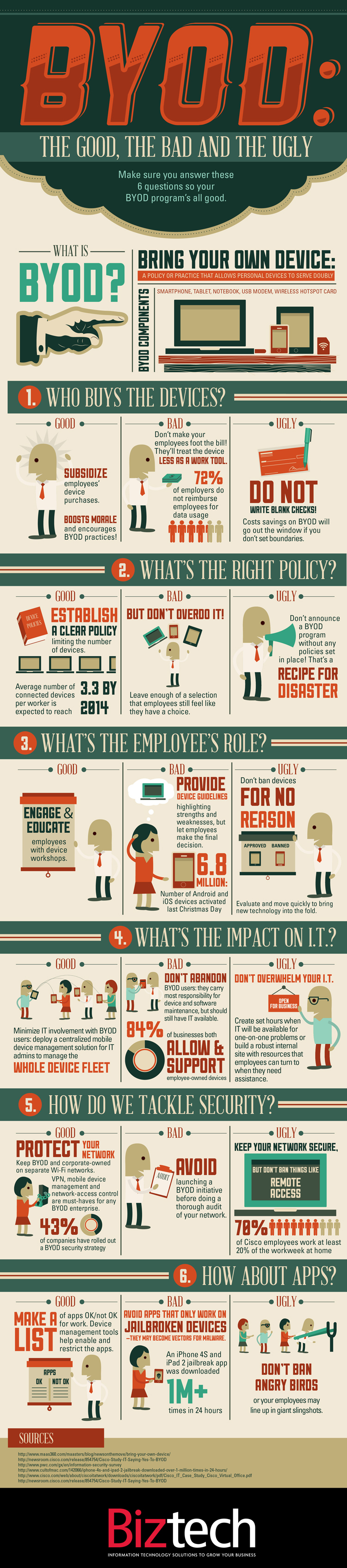
BYOD Infographic

BYOD: The Good the Bad the Ugly infographic


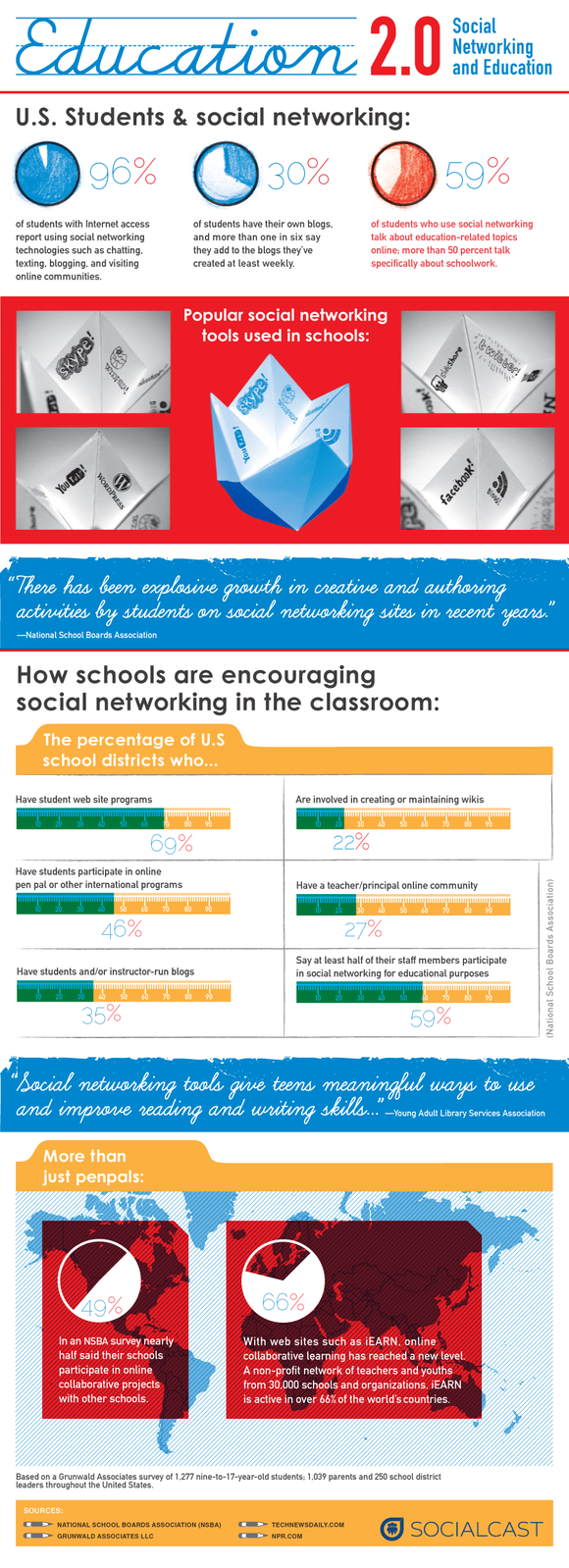
Good Infographic on Social Media and Teens...
http://blog.socrato.com/wp-content/uploads/2011/03/Education-20.png

Check out more infographics...
http://www.coolinfographics.com/

Want to create your own infographic... Free stuff!

http://www.makeuseof.com/tag/awesome-free-tools-infographics/


Monday, September 10, 2012

Turning Noneducational Games into Learning Fun - The Organized Classroom Blog

Turning Noneducational Games into Learning Fun - The Organized Classroom Blog

Great ideas for teachers... makes me sort of wish I could set up some of these ideas now! Yes, I'm still waiting for the baby!

Friday, September 7, 2012

A little something on Deductive Reasoning....

As many may know... I am expecting a baby any day now... I hope.... Anyways, one of the ways I pass the time, aside from the usual household chores and playing with my daughter, is researching educational topics that grab my attention. Usually I go for the "Techy" stuff.... but here's something a little different... DEDUCTIVE REASONING... Why did this pop into my head? Who knows?? Remember I have "Baby Brain"!

So what's Deductive Reasoning? How does deductive reasoning connect to CSI, Sherlock Holmes and grade 7/8 students? Well learning more about deductive reasoning will help you write sound arguments for things like... persuasive essays. A sound argument makes you more persuasive. So what? You may wonder... well think about jobs and careers that utilize this skill... What comes to mind?
*Lawyers
*Judges
*Police Officers
*Advertising and Marketing Teams
*Teachers??!!

A little blurb ripped off a website on deductive reasoning...


How do I Develop Deductive Reasoning & Critical-Thinking Skills?


How do I Develop Deductive Reasoning & Critical-Thinking Skills? thumbnail
Word puzzles strengthen critical-thinking skills.
The development of critical-thinking skills is important in children and adults. Deductive reasoning is a subset of critical thinking. Critical thinking can also be called evaluative thinking, according to the American Scientific Affiliation. It is the ability to solve problems and draw conclusions with limited data. Deductive reasoning is the part of critical thinking that allows for problem solving.


Read more: How do I Develop Deductive Reasoning & Critical-Thinking Skills? | eHow.com http://www.ehow.com/how_6925811_do-reasoning-_amp_-critical_thinking-skills_.html#ixzz25ofMbMUv


So check out the site below...

http://www.ehow.com/how_6925811_do-reasoning-_amp_-critical_thinking-skills_.html

The Tips...


Instructions

    • 1
      Complete puzzles. This is an excellent way to put your critically thinking mind to work. Word puzzles, riddles and even math word problems sharpen the mind and critical-thinking skills.
    • 2
      Solve a Sudoku. This is another form of puzzle that exercises the mind.
    • 3
      Utilize Edward de Bono's Six Thinking Hats. http://www.mindtools.com/pages/article/newTED_07.htm
      He teaches to picture a given situation like an island and divide the island into north, south, east and west quadrants. Focus on each direction separately. Using this method allows you to notice and retain details in each smaller area, essentially breaking down a situation to allow for individual observations. He states that confusion is the enemy of good thinking skills.
    • 4
      Start young. The earlier critical thinking is taught, the better an individual will progress. But even an elderly person can train his mind to take an evaluative approach to any matter or problem.

Tips & Warnings

  • Write things down. Writing down thoughts, even journaling, encourages organized thought processes that lead to critical thinking and deductive reasoning.
  • Exercising the brain is important throughout life to decrease your chances of degenerative neural diseases later in life.


Read more: How do I Develop Deductive Reasoning & Critical-Thinking Skills? | eHow.com http://www.ehow.com/how_6925811_do-reasoning-_amp_-critical_thinking-skills_.html#ixzz25ogBM6Yw